Get Started with RabbitQA
Your comprehensive guide to getting up and running with the RabbitQA Deep Testing Platform.
This guide will walk you through the essential steps to set up your account, configure your workspace, and start leveraging RabbitQA's powerful testing capabilities. Follow along to master the fundamentals and become productive quickly.
Get Started in 4 Simple Steps
Follow these four essential steps to set up your RabbitQA workspace and begin your quality assurance journey today.
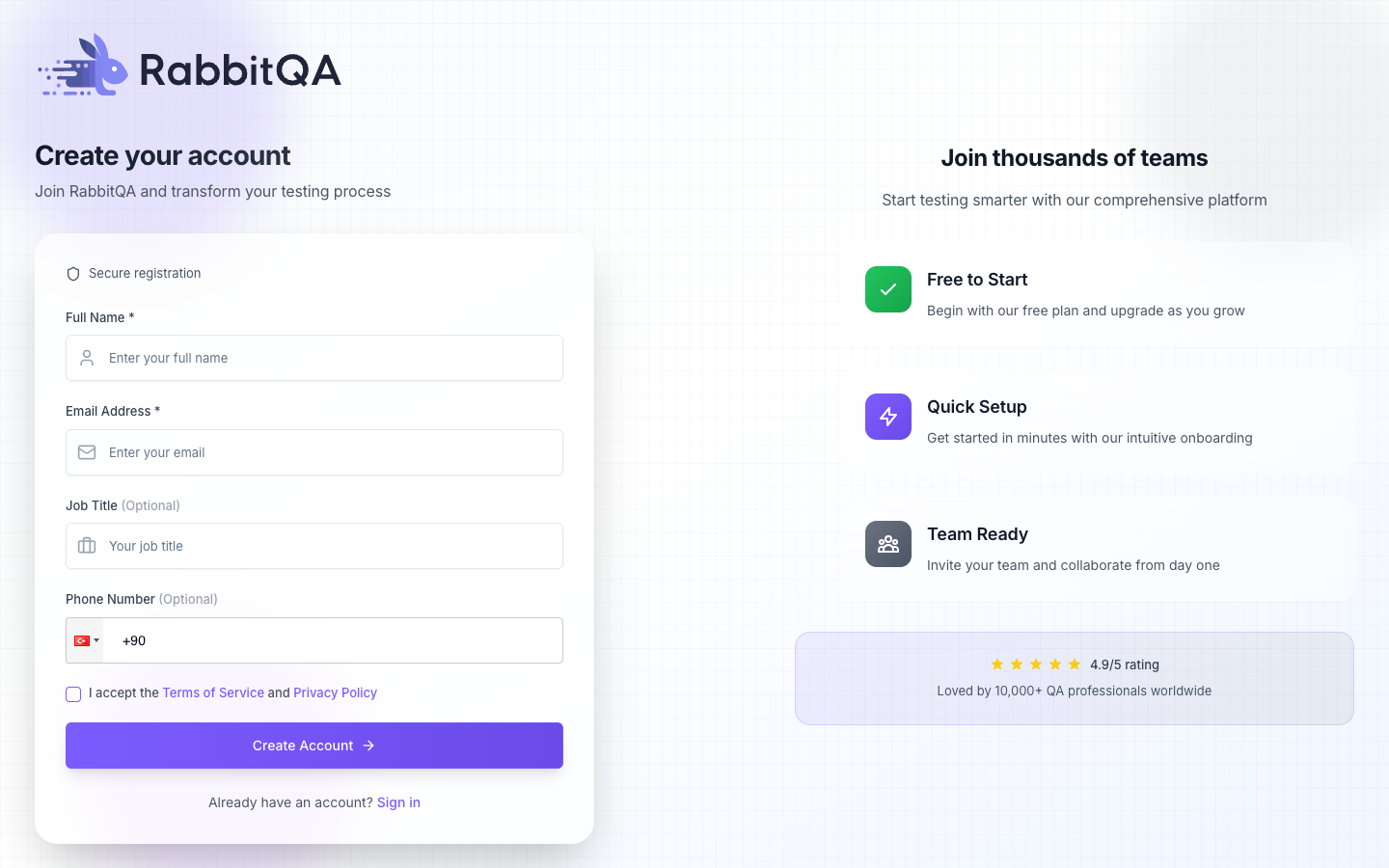
1. Create Your Account
Sign up for RabbitQA and set up your user profile to begin your quality assurance journey.
2. Set Up Your Organization
Configure your organization settings, invite team members, and define roles to establish your testing workspace.
3. Upload Your First Document
Begin by uploading your requirement documents to the Analyzer module for AI-powered analysis.
4. Create Test Cases
Generate test cases using AI assistance or create them manually in CaseWriter to build your test repository.
Explore Core Modules
Discover the modules that power RabbitQA's comprehensive testing platform.
TestPilot
Test Execution & Reporting — Execute test runs, track progress in real-time, and generate comprehensive reports with detailed analytics. Learn More about TestPilot
CaseWriter
Test Case Management — Create, organize, and manage test cases with AI assistance and maintain comprehensive test coverage. Learn More about CaseWriter
DataCrate
Test Data Management — Create, manage, and provision test data with synthetic data generation and reusable datasets, rules, libraries, templates, and mock services. Learn More about DataCrate
Analyzer
AI-Powered Document Analysis — Score requirement documents, review metric evidence, and identify prioritized improvements before downstream generation. Learn More about Analyzer
SmartRequest
Request Management — AI-powered request creation, evaluation, scoring, and approval workflows with Kanban board management. Learn More about SmartRequest
Smart PBI
Product Backlog Generation — Automatically generate Product Backlog Items from documents, free text, images, and SmartRequest data using AI. Learn More about Smart PBI
AutoRunner
Test Automation & CI/CD — Automate your testing with BDD scenarios, integrate with CI/CD pipelines, and schedule automated test runs. Learn More about AutoRunner
SmartAPI
API Testing — Import API sources, discover endpoints and flows, and generate reviewable API test assets. Learn More about SmartAPI
MobileHub
Mobile Device Farm — Manage test devices centrally, run live and automated tests with Appium, and streamline device allocation. Learn More about MobileHub
BrowserHub
Cross-Browser Testing — Review available browser capabilities and run live or automated browser sessions through the connected device-farm platform. Learn More about BrowserHub
Accessibility
WCAG Compliance — Run automated accessibility audits powered by Google Lighthouse, track WCAG compliance, and generate reports. Learn More about Accessibility
RoboClick
POS Device Control — Select configured POS devices and runners, discover connected hardware, and control reserved manual sessions. Learn More about RoboClick
Key Features
RabbitQA provides powerful features that help teams work more efficiently and deliver higher quality software.
AI-Powered Analysis
Automate document analysis, test case generation, and quality assessments with advanced AI algorithms.
- Automated requirement extraction
- Intelligent test scenario generation
- Smart improvement suggestions
- Risk and gap identification
Real-Time Collaboration
Work together seamlessly with your team through integrated communication and collaboration features.
- Team workspaces and sharing
- Collaborative document editing
- Comments and review system
- Activity tracking and notifications
Continuous Integration
Integrate with your existing CI/CD pipeline and development workflow for automated quality gates.
- RESTful API integrations
- Webhook support and events
- Automated workflow triggers
- Custom reporting capabilities
User Roles & Permissions
Understand the different permission levels and what each role can access within the RabbitQA platform.
User
Standard team member role with access to core testing and collaboration features.
- View and create content
- Execute test runs
- Generate basic reports
- Collaborate with team members
Administrator
Team leader role with full management capabilities and configuration access.
- User management and roles
- Organization settings
- Advanced configuration
- Team oversight and analytics
Super Administrator
Organization-wide administrator with complete control over all system aspects.
- System-wide administration
- Billing and subscription management
- Global settings and policies
- Priority support access
Common Workflows
Learn how to effectively use RabbitQA modules together with these common testing workflows and real-world scenarios.
Bug Testing Workflow
Complete workflow for investigating and documenting bugs with comprehensive test coverage.
| Step | Action | Module | Time |
|---|---|---|---|
| 1 | Analyze bug report with Analyzer | Analyzer | 5 min |
| 2 | Create reproduction steps in CaseWriter | CaseWriter | 10 min |
| 3 | Execute test scenarios in TestPilot | TestPilot | 15 min |
| 4 | Document results and findings | All Modules | 10 min |
Feature Testing Workflow
End-to-end testing workflow for new feature releases with automated test execution.
| Step | Action | Module | Time |
|---|---|---|---|
| 1 | Review requirements in Analyzer | Analyzer | 10 min |
| 2 | Design test scenarios in CaseWriter | CaseWriter | 20 min |
| 3 | Execute automated tests | TestPilot | 30 min |
| 4 | Run regression test suite | TestPilot | 15 min |
Best Practices & Success Tips
Maximize your productivity with RabbitQA.
Start Small
Focus on mastering one module at a time. Begin with Analyzer to understand the AI capabilities before expanding to other features.
Use Templates
Take advantage of built-in templates and presets. They embody best practices and help you get productive faster.
Follow Workflows
Stick to recommended workflows initially. They are designed for efficiency and will help you avoid common pitfalls.
Regular Reviews
Schedule periodic team reviews to assess progress. Regular retrospectives help identify improvements and celebrate wins.
Feedback Loop
Establish a continuous feedback mechanism. Use insights from reports and analytics to refine your testing approach.
Quality First
Prioritize thoroughness over speed initially. Building a solid foundation leads to faster execution in the long run.
Need Help?
If you encounter any issues, browse the RabbitQA documentation or contact your organization's RabbitQA administrator for assistance.
Next Steps
Continue exploring RabbitQA and start testing:
- Explore Dashboard - View metrics and insights
- Try Analyzer Module - Upload and analyze documents
- Create First Test Case - Build your test repository
- Run Your First Test - Execute and track results
Ready to Start Testing? You're now ready to start testing with RabbitQA! Begin with the Analyzer module to see how AI can transform your quality assurance process.
