Issue Tracker
Accessibility uses RabbitQA's shared Issue Tracker. It combines issues created from test evidence with manually created or externally linked work items.
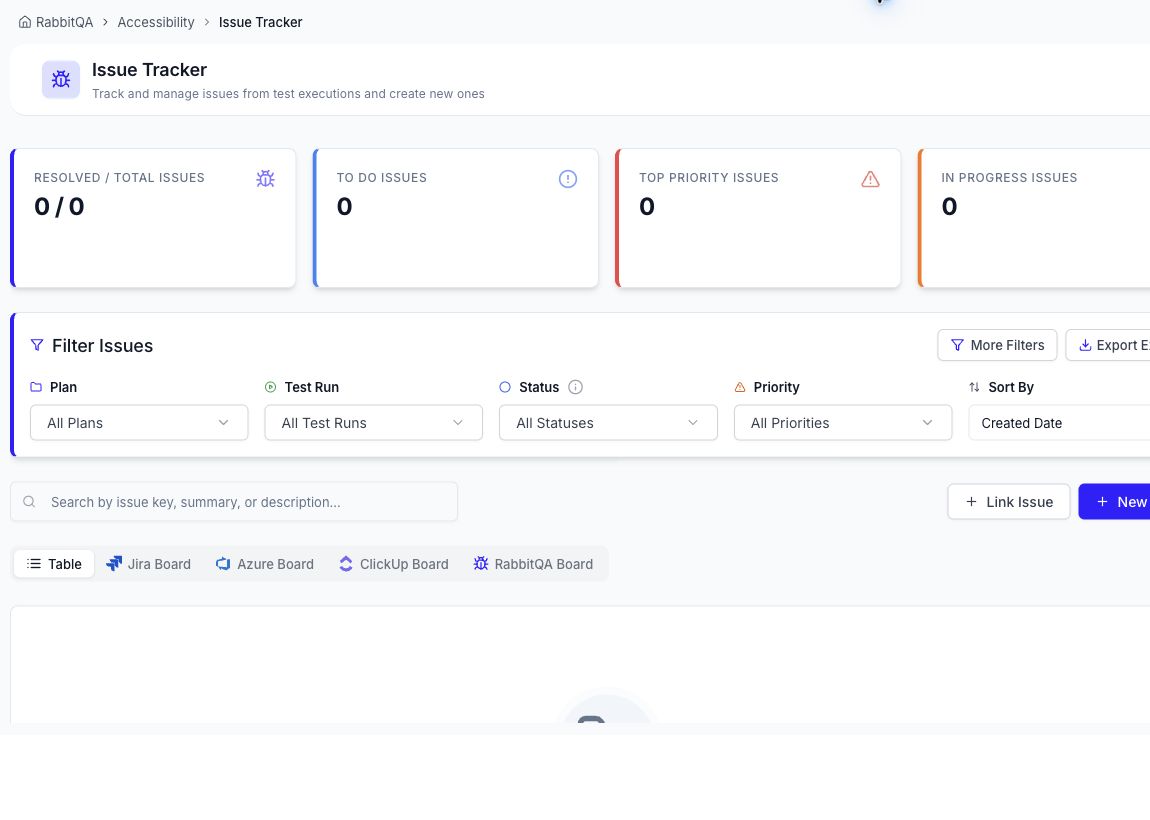
What the page shows
- resolved and total issue counts;
- To Do, top-priority, and In Progress summaries;
- plan, test run, status, priority, sort, and text filters;
- a table plus available Jira, Azure, ClickUp, and RabbitQA board views; and
- actions to link an issue or create a new one.
Use Export Excel when a spreadsheet snapshot of the current issue data is needed. This export belongs to the shared Issue Tracker; it is not an export of the Accessibility audit report itself.
Create an issue from a finding
- Open a completed audit report.
- Locate the failed finding.
- Start the issue action and select the relevant plan or connected tracker.
- Review the generated context, add ownership and priority, and create the issue.
- Track remediation in the Issue Tracker and rerun the audit after the fix is deployed.
Available external board tabs depend on the integrations configured for the workspace. If no issues exist yet, the page displays an empty state until work items are created or linked.
