Issue Tracker
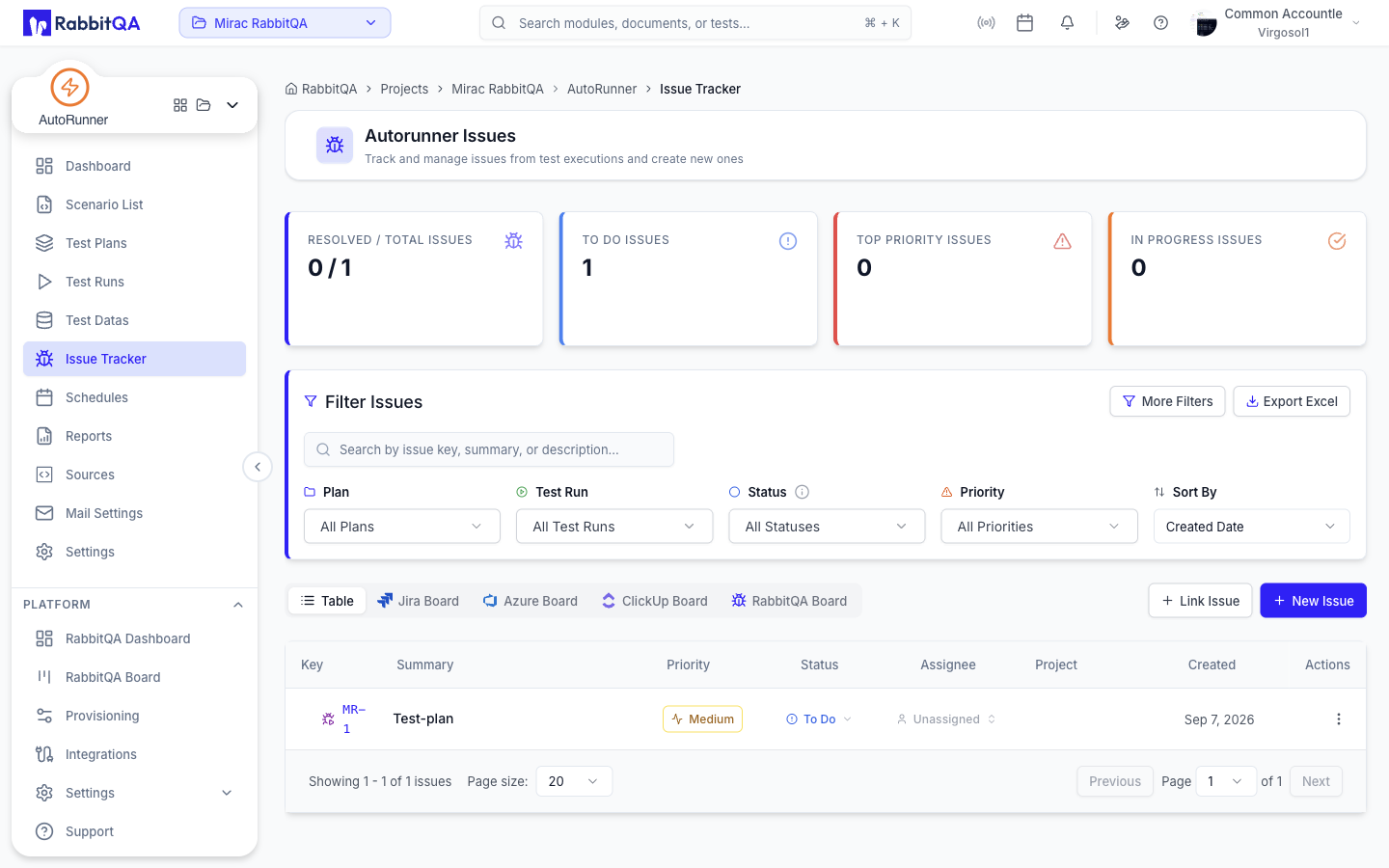
Autorunner Issues tracks the issues raised from test executions and lets you create new ones.
Report a bug straight from a failed scenario in Run Detail, then manage it here.
Metrics
Four cards summarize the current state:
| Card | Shows |
|---|---|
| Resolved / Total Issues | How much of the backlog is closed |
| To Do Issues | Issues not yet started |
| Top Priority Issues | The highest-priority open issues |
| In Progress Issues | Issues being worked on |
Filtering
The Filter Issues card carries the primary filters:
| Filter | Notes |
|---|---|
| Search | By issue key, summary, or description |
| Plan | Restrict to issues from one test plan |
| Test Run | Restrict to issues from one run |
| Status | Issue workflow status |
| Priority | Issue priority |
| Sort By | Created Date, Updated Date, Priority, or Status |
More Filters adds a labels multi-select, an assignee filter, and a From / To date range.
Clear All resets everything, and Export Excel downloads the filtered list.
Views
| View | Shows |
|---|---|
| Table | The issue list as a sortable table |
| Jira Board | A board view of the linked Jira project |
| Azure Board | A board view for Azure DevOps, when enabled |
| ClickUp Board | A board view for ClickUp, when connected |
| RabbitQA Board | A board view of RabbitQA-native issues |
Board views appear only for the trackers your organization has connected.
Table Columns
| Column | Content |
|---|---|
| Key | The issue key |
| Summary | The issue title |
| Priority | Issue priority |
| Status | Workflow status |
| Assignee | Who owns it |
| Project | The originating project |
| Created | When it was raised |
Creating and Linking
- New Issue creates an issue.
- Link Issue attaches an existing tracker issue to the current context.
Both need issue-create permission. Link Issue stays disabled while no issue tracker connection is configured.
Connect a tracker in Platform Integrations.
Next Steps
- Run Detail — Report a bug from a failing scenario
- Reports — See the failures behind these issues
- TestPilot Issue Tracker — The same tracker from manual testing
