CI/CD Integration
Connect AutoRunner to your CI/CD pipelines to trigger test runs automatically, enforce quality gates, and report results back to your deployment workflow.
Overview
AutoRunner provides webhook endpoints and a REST API that allow any CI/CD platform to start test runs, poll for results, and make pass/fail decisions. You configure webhooks in the project settings, generate secure tokens, and embed API calls into your pipeline definitions.
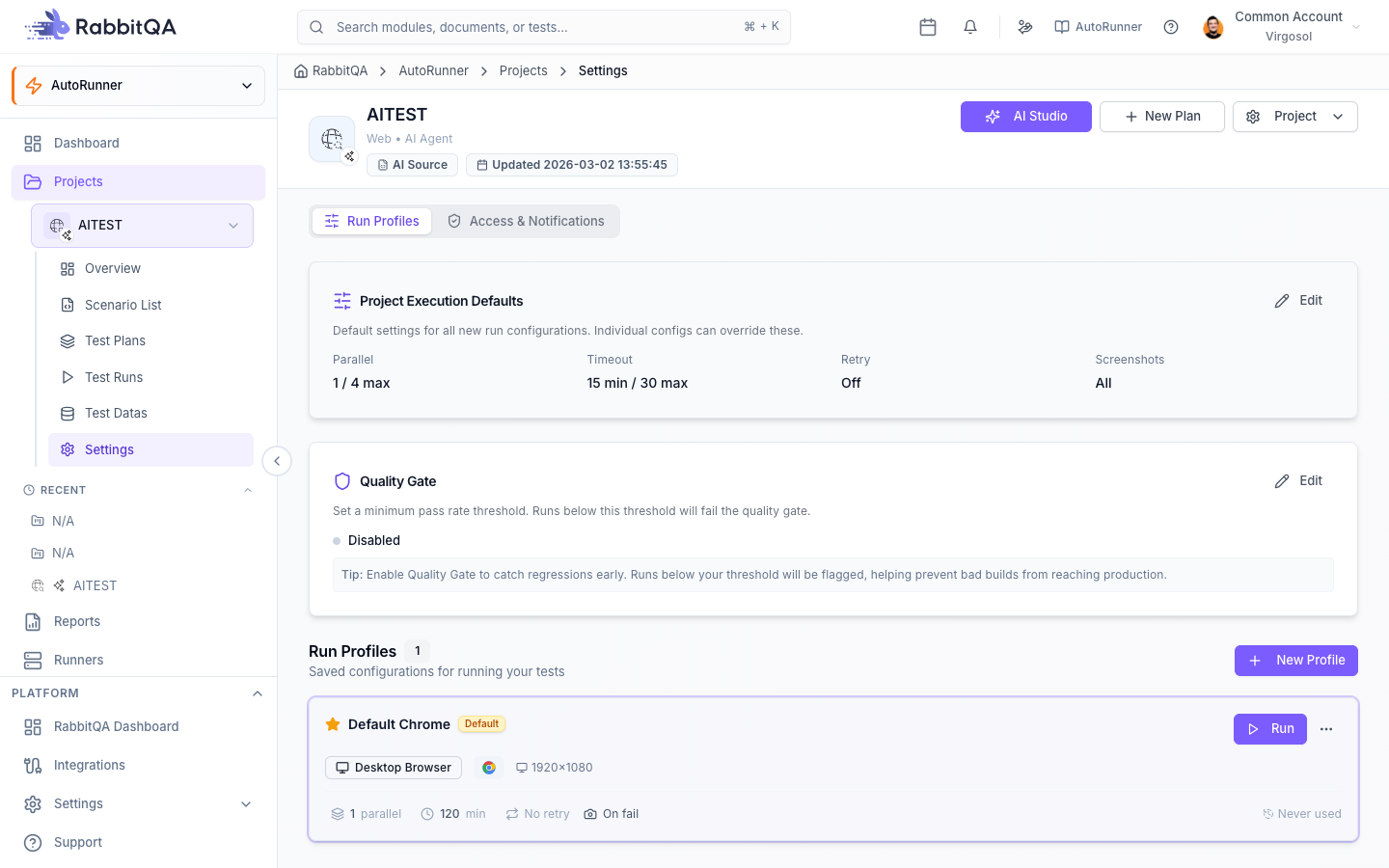
Webhook Configuration
Webhooks are managed from the Access sub-tab in your project settings.
- Navigate to AutoRunner > Projects and open the target project.
- Go to Settings > Access.
- Click Create Webhook.
- Configure the webhook fields:
| Field | Description |
|---|---|
| Name | A descriptive label for this webhook (e.g., "GitHub Main Branch") |
| Suite | The test suite to execute when the webhook is triggered |
| Run Profile | The environment and driver configuration to use |
| Token | Auto-generated authentication token (click Regenerate to rotate) |
| Active | Toggle to enable or disable the webhook without deleting it |
- Click Save to create the webhook and copy the generated endpoint URL.
Store webhook tokens in your CI/CD platform's secret management system. Never commit tokens to source control. Rotate tokens periodically or immediately if a token is compromised.
Webhook Endpoint
All webhook triggers use the following endpoint:
POST /autorunner/api/v1/webhooks
Include the token in the Authorization header:
curl -X POST https://app.rabbitqa.com/autorunner/api/v1/webhooks \
  -H "Authorization: Bearer <WEBHOOK_TOKEN>" \
  -H "Content-Type: application/json" \
  -d '{
    "suiteId": "suite-abc-123",
    "runProfileId": "profile-default",
    "tags": ["smoke"],
    "notifyOnComplete": true
  }'
The API returns a run ID that you can use to poll for results:
{
  "runId": "run-xyz-789",
  "status": "QUEUED",
  "suiteId": "suite-abc-123",
  "triggeredBy": "webhook"
}
API-Based Triggering
For more control than a simple webhook, use the AutoRunner REST API directly:
# Start a test run
curl -X POST https://app.rabbitqa.com/autorunner/api/v1/runs \
  -H "Authorization: Bearer <API_KEY>" \
  -H "Content-Type: application/json" \
  -d '{
    "projectId": "proj-123",
    "suiteId": "suite-abc-123",
    "tags": ["regression"],
    "environment": "staging"
  }'

# Poll for results
curl -X GET https://app.rabbitqa.com/autorunner/api/v1/runs/run-xyz-789 \
  -H "Authorization: Bearer <API_KEY>"
Quality Gate Integration
Configure quality gates to make your pipeline pass or fail based on test results:
| Threshold | Description | Example |
|---|---|---|
| Minimum Pass Rate | The percentage of scenarios that must pass | 95% |
| Maximum Failures | The absolute number of allowed failures before the gate fails | 3 |
| Zero Critical Failures | Fail the gate if any scenario tagged @critical fails | Enabled |
| Timeout | Maximum time to wait for the run to complete before aborting | 30 minutes |
When a quality gate is not met, the API returns a non-zero exit status and a failure summary, allowing your pipeline to halt deployment.
Pipeline Examples
GitHub Actions
name: Run AutoRunner Tests

on:
  push:
    branches: [main]
  pull_request:
    branches: [main]

jobs:
  test:
    runs-on: ubuntu-latest
    steps:
      - name: Trigger AutoRunner Suite
        id: trigger
        run: |
          RESPONSE=$(curl -s -X POST \
            https://app.rabbitqa.com/autorunner/api/v1/webhooks \
            -H "Authorization: Bearer ${{ secrets.RABBITQA_WEBHOOK_TOKEN }}" \
            -H "Content-Type: application/json" \
            -d '{"suiteId": "${{ vars.SUITE_ID }}"}')
          echo "run_id=$(echo $RESPONSE | jq -r '.runId')" >> $GITHUB_OUTPUT

      - name: Wait for Results
        run: |
          for i in $(seq 1 60); do
            STATUS=$(curl -s \
              https://app.rabbitqa.com/autorunner/api/v1/runs/${{ steps.trigger.outputs.run_id }} \
              -H "Authorization: Bearer ${{ secrets.RABBITQA_WEBHOOK_TOKEN }}" \
              | jq -r '.status')
            if [ "$STATUS" = "COMPLETED" ] || [ "$STATUS" = "FAILED" ]; then
              break
            fi
            sleep 30
          done

      - name: Check Quality Gate
        run: |
          RESULT=$(curl -s \
            https://app.rabbitqa.com/autorunner/api/v1/runs/${{ steps.trigger.outputs.run_id }} \
            -H "Authorization: Bearer ${{ secrets.RABBITQA_WEBHOOK_TOKEN }}")
          PASS_RATE=$(echo $RESULT | jq -r '.passRate')
          echo "Pass rate: $PASS_RATE%"
          if (( $(echo "$PASS_RATE < 95" | bc -l) )); then
            echo "Quality gate failed: pass rate below 95%"
            exit 1
          fi
GitLab CI
stages:
  - test

autorunner:
  stage: test
  image: curlimages/curl:latest
  variables:
    RABBITQA_URL: "https://app.rabbitqa.com/autorunner/api/v1"
  script:
    - |
      RESPONSE=$(curl -s -X POST "$RABBITQA_URL/webhooks" \
        -H "Authorization: Bearer $RABBITQA_WEBHOOK_TOKEN" \
        -H "Content-Type: application/json" \
        -d "{\"suiteId\": \"$SUITE_ID\"}")
      RUN_ID=$(echo $RESPONSE | jq -r '.runId')
      echo "Started run: $RUN_ID"
    - |
      for i in $(seq 1 60); do
        STATUS=$(curl -s "$RABBITQA_URL/runs/$RUN_ID" \
          -H "Authorization: Bearer $RABBITQA_WEBHOOK_TOKEN" \
          | jq -r '.status')
        [ "$STATUS" = "COMPLETED" ] || [ "$STATUS" = "FAILED" ] && break
        sleep 30
      done
    - |
      PASS_RATE=$(curl -s "$RABBITQA_URL/runs/$RUN_ID" \
        -H "Authorization: Bearer $RABBITQA_WEBHOOK_TOKEN" \
        | jq -r '.passRate')
      echo "Pass rate: $PASS_RATE%"
      [ "$(echo "$PASS_RATE >= 95" | bc -l)" -eq 1 ] || exit 1
  only:
    - main
    - merge_requests
Jenkins (Jenkinsfile)
pipeline {
    agent any
    environment {
        RABBITQA_URL = 'https://app.rabbitqa.com/autorunner/api/v1'
        RABBITQA_TOKEN = credentials('rabbitqa-webhook-token')
    }
    stages {
        stage('Run AutoRunner Tests') {
            steps {
                script {
                    def response = sh(
                        script: """
                            curl -s -X POST "${RABBITQA_URL}/webhooks" \
                                -H "Authorization: Bearer ${RABBITQA_TOKEN}" \
                                -H "Content-Type: application/json" \
                                -d '{"suiteId": "${params.SUITE_ID}"}'
                        """,
                        returnStdout: true
                    ).trim()
                    def runId = readJSON(text: response).runId
                    echo "Started run: ${runId}"

                    // Poll for completion
                    def status = 'RUNNING'
                    for (int i = 0; i < 60 && status == 'RUNNING'; i++) {
                        sleep(30)
                        def result = sh(
                            script: """
                                curl -s "${RABBITQA_URL}/runs/${runId}" \
                                    -H "Authorization: Bearer ${RABBITQA_TOKEN}"
                            """,
                            returnStdout: true
                        ).trim()
                        status = readJSON(text: result).status
                    }

                    // Quality gate
                    def finalResult = sh(
                        script: """
                            curl -s "${RABBITQA_URL}/runs/${runId}" \
                                -H "Authorization: Bearer ${RABBITQA_TOKEN}"
                        """,
                        returnStdout: true
                    ).trim()
                    def passRate = readJSON(text: finalResult).passRate
                    echo "Pass rate: ${passRate}%"
                    if (passRate < 95) {
                        error("Quality gate failed: pass rate ${passRate}% is below 95%")
                    }
                }
            }
        }
    }
}
Azure DevOps
trigger:
  branches:
    include:
      - main

pool:
  vmImage: 'ubuntu-latest'

steps:
  - task: Bash@3
    displayName: 'Trigger AutoRunner Suite'
    inputs:
      targetType: 'inline'
      script: |
        RESPONSE=$(curl -s -X POST \
          "https://app.rabbitqa.com/autorunner/api/v1/webhooks" \
          -H "Authorization: Bearer $(RABBITQA_WEBHOOK_TOKEN)" \
          -H "Content-Type: application/json" \
          -d '{"suiteId": "$(SUITE_ID)"}')
        RUN_ID=$(echo $RESPONSE | jq -r '.runId')
        echo "##vso[task.setvariable variable=RUN_ID]$RUN_ID"
        echo "Started run: $RUN_ID"

  - task: Bash@3
    displayName: 'Wait and Check Quality Gate'
    inputs:
      targetType: 'inline'
      script: |
        for i in $(seq 1 60); do
          STATUS=$(curl -s \
            "https://app.rabbitqa.com/autorunner/api/v1/runs/$(RUN_ID)" \
            -H "Authorization: Bearer $(RABBITQA_WEBHOOK_TOKEN)" \
            | jq -r '.status')
          [ "$STATUS" = "COMPLETED" ] || [ "$STATUS" = "FAILED" ] && break
          sleep 30
        done
        PASS_RATE=$(curl -s \
          "https://app.rabbitqa.com/autorunner/api/v1/runs/$(RUN_ID)" \
          -H "Authorization: Bearer $(RABBITQA_WEBHOOK_TOKEN)" \
          | jq -r '.passRate')
        echo "Pass rate: $PASS_RATE%"
        if (( $(echo "$PASS_RATE < 95" | bc -l) )); then
          echo "##vso[task.logissue type=error]Quality gate failed"
          exit 1
        fi
Notification Configuration
Configure notifications to alert your team when pipeline-triggered runs complete:
| Setting | Description |
|---|---|
| Email Recipients | Comma-separated list of email addresses to notify |
| Trigger Rules | Choose when to send notifications: Always, On Failure Only, or On Recovery |
| Include Report | Attach a summary report to the notification email |
| Webhook Callback | POST results back to a URL (e.g., Slack incoming webhook) |
Configure notifications in Project Settings > Notifications or pass notifyOnComplete: true in the webhook payload.
Result Reporting
After a run completes, retrieve structured results for your pipeline logs:
curl -s https://app.rabbitqa.com/autorunner/api/v1/runs/run-xyz-789/summary \
  -H "Authorization: Bearer <API_KEY>"
The summary includes:
- Total scenarios, passed, failed, skipped counts
- Pass rate percentage
- Execution duration
- List of failed scenarios with error messages
- Quality gate verdict (PASSED / FAILED)
Use this data to annotate your CI/CD build with test results or to generate custom reports.
Use the pass rate from the API response to generate dynamic status badges in your repository README or dashboard.
Next Steps
- Scheduling — Automate test runs on a recurring cadence
- Reports — Dive deeper into test results and trends
- Projects — Configure project settings and webhook access
- BDD Scenarios — Write the scenarios your pipeline will execute
