Data Repository
Data Repository presents DataCrate content as a folder tree with a detail panel for the selected node.
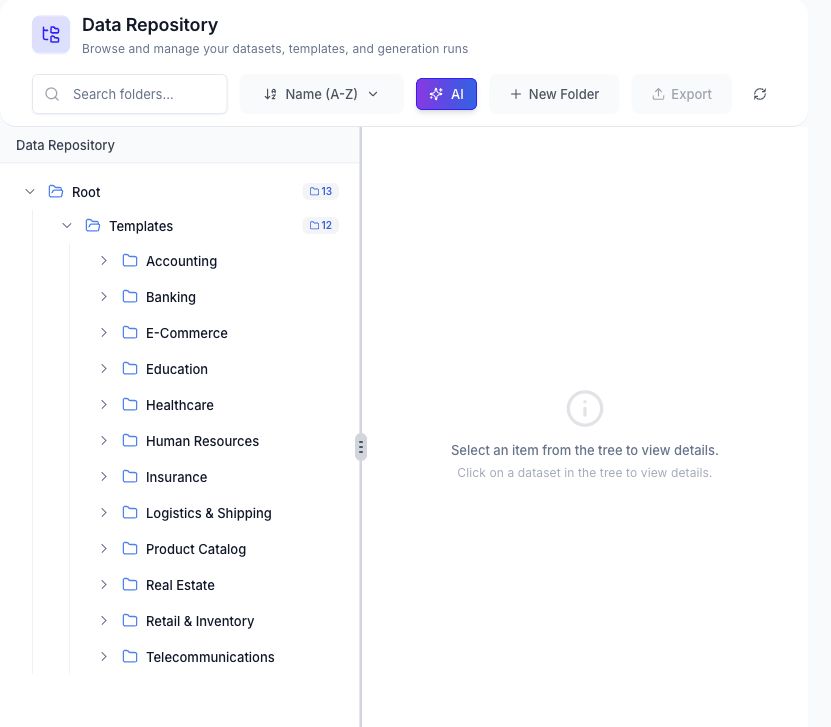
Browse the Repository
Use the tree to expand folders and select a template, dataset, generated file, or supported run artifact. The counters shown beside a folder summarize its child content.
The detail panel changes with the selected node and can show:
- Name, description, path, and timestamps.
- File type, size, and row count.
- Detected columns, sample values, and schema information.
- Generation prompt or associated runs where available.
- Preview and download actions for supported files.
Search and Sort
Search filters the visible folder tree by name. The sort menu supports name, creation date, and update date ordering. Use Refresh after an operation performed elsewhere in DataCrate when the tree has not updated.
Folders
Select New Folder to add a folder beneath the chosen parent. Folder actions can include rename, move, and delete according to the selected node and account permissions.
Deleting a folder or artifact is a workspace change and may be irreversible. Review its child content before confirming.
Generate with AI
Generate with AI opens DataCrate generation from the repository context. Review the source, schema, output folder, and generated file name before submitting the new run.
Export
Export is enabled only when the current selection and workspace support it. Use the file-level download action when you need one artifact rather than a repository selection.
Related Pages
- Manage user-supplied datasets in Uploaded Files.
- Review run status in Data Sessions.
- Maintain reusable schemas in Provisioning.
