Test Plans
Test Plans are the top level of the TestPilot hierarchy. A plan groups related test runs so you can track progress and quality for a release, sprint, or product area in one place.
Test Plans replaced the earlier Release grouping layer.
The old /testpilot/projects address still works and redirects to /testpilot/test-plans, carrying any query parameters with it.
The Test Plans page
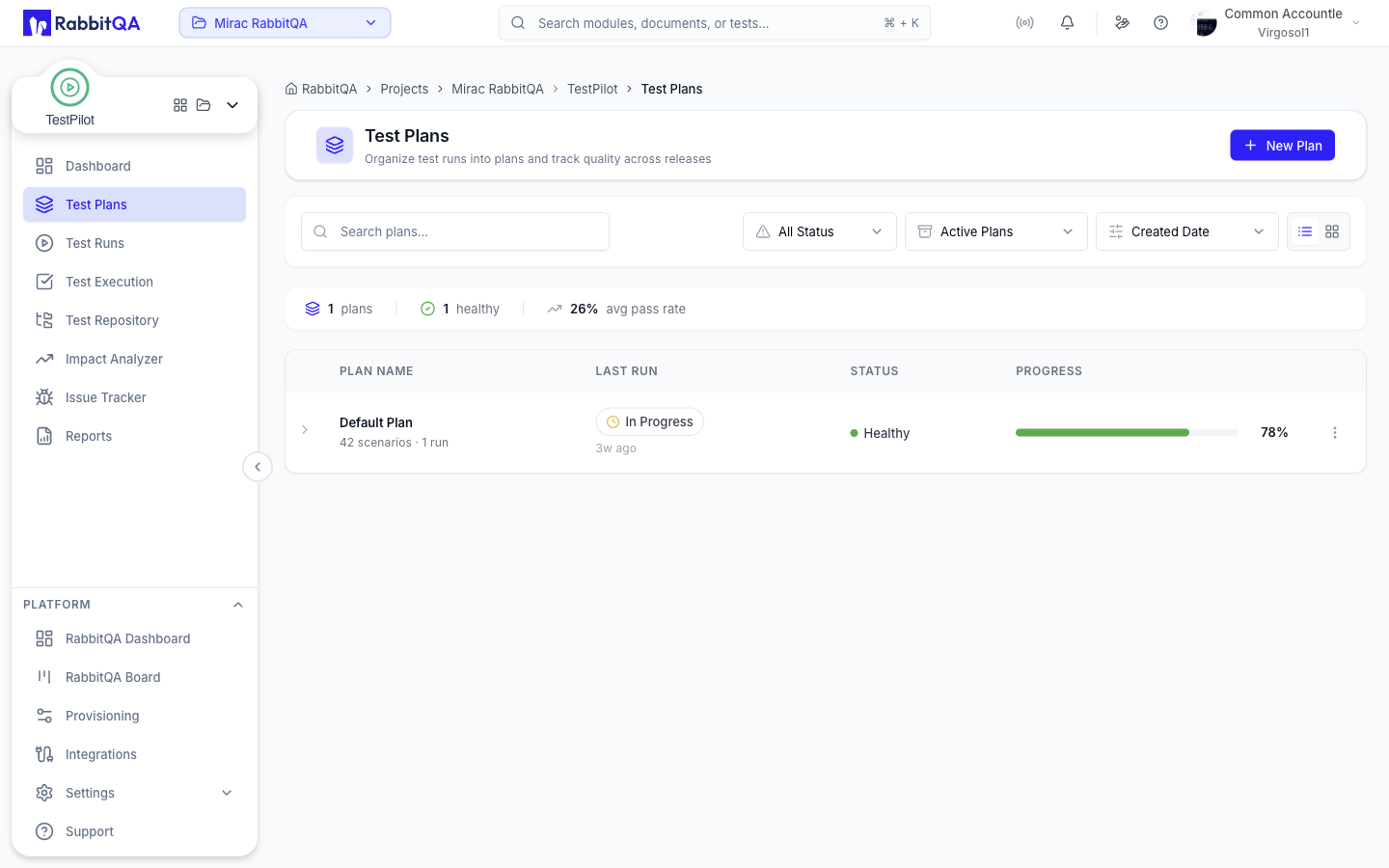
Open TestPilot > Test Plans. The page lists every plan in the active project and lets you expand a plan to see the runs inside it.
Toolbar
| Control | Options |
|---|---|
| Search | Free text search over plan names |
| Health | All Status, Healthy, Warning, Critical |
| Archive state | Active Plans, Archived Plans, All Plans |
| Sort by | Created Date, Oldest First, Name (A-Z), Name (Z-A), Progress (High), Progress (Low) |
| View | List (expandable table) or Card grid |
The chosen view is remembered for the rest of your browser session. Plans load as you scroll rather than through a pager.
Summary bar
Above the list, a single row summarizes the loaded plans:
- Number of plans
- Number of plans in the Healthy state
- Average pass rate
List columns
| Column | Contents |
|---|---|
| Plan Name | Plan name plus a N scenarios · N runs meta line |
| Last Run | Completed, Overdue, In Progress, or No runs yet, with a relative timestamp |
| Status | Plan health: Healthy, Warning, Critical, or No runs |
| Progress | Completion percentage bar |
Health is derived from the plan's runs. A plan with no runs yet is shown in a neutral "No runs" state rather than as a warning.
Creating and editing a plan
Click New Plan, or choose Edit Plan from a plan's action menu.
| Field | Notes |
|---|---|
| Plan Name | Required |
| Plan Description | Optional free text |
| Type | Regression, Smoke, Manual, Automation |
| Platform | Multi-select: WEB, MOBILE, API, DESKTOP |
| Environment | DEVELOPMENT, TEST, STAGING, PRODUCTION |
| Priority | Critical, High, Medium, Low |
| Start Date / End Date | Both required; the end date must be after the start date |
| Test Cases | A dual-panel picker that stages the plan's test cases |
Test cases selected in the form are saved with the plan itself, in the same submit. There is no separate assignment step for a plan.
Plans saved earlier with the short environment values DEV and PROD are normalized to DEVELOPMENT and PRODUCTION when you reopen them, so the environment field is never blank on edit.
You can also open the create form directly with /testpilot/test-plans?action=create.
Plan actions
Each plan row has an action menu:
- Edit Plan - reopen the plan form
- Duplicate Plan - open a copy dialog, prefilled with the name
<plan name> - Copy, offering the same four options as a run clone: include execution attachments, test execution status, assignees, and linked Jira issues - Archive Plan / Activate Plan - move the plan out of, or back into, the active list
- Delete Plan - remove the plan; its linked test runs are kept
Creating, editing, and deleting plans are permission-gated. See the permission model below.
Runs inside a plan
Expand a plan row to reveal its Recent Runs sub-table, which loads the plan's runs on demand and shows the five most recent.
| Column | Contents |
|---|---|
| Recent Runs | Run name and status icon |
| Run Profile | Type, platforms, and environment |
| Results | Pass rate and result counters for the run |
| Timeline | Start and end dates |
Result counters come from a plan-scoped run summary, so the numbers in this table reflect the plan rather than the whole workspace.
Each run row offers:
- View Executions - open the run's executions
- Copy URL - copy a direct link to the run's executions
- Edit - edit the run
- Clone - copy the run
- Manage Test Cases - add or remove the run's test cases
- Remove from Plan - unlink the run from this plan; the run itself is kept
- Delete Test Run - permanently delete the run
Remove from Plan and Delete Test Run are different actions. Removing only clears the link between the run and the plan. Deleting destroys the run and cannot be undone.
Deep links
Test Plans and Test Runs are joined by the planId query parameter.
| Link | Result |
|---|---|
/testpilot/test-runs?planId=<id> | Test Runs, filtered to that plan |
/testpilot/test-executions?planId=<id>&testRunId=<id> | Executions for one run inside that plan |
Clicking a plan name, or View all runs in the expanded sub-table, takes you to the plan-scoped run list.
Older links that use projectId instead of planId still resolve.
Permissions
Plan and run actions are gated on the TestPilot test set permissions:
| Action | Permission key |
|---|---|
| Create a plan or run | testpilot:testset:create |
| Edit a plan or run | testpilot:testset:update |
| Delete a plan or run | testpilot:testset:delete |
Controls you do not hold the permission for are hidden. The backend re-checks every request, so hiding a button is a convenience, not the security boundary.
Next steps
- Test Runs - configure and run a campaign inside a plan
- Test Executions - record results
- Reports - report on a plan or a single run
