Provisioning
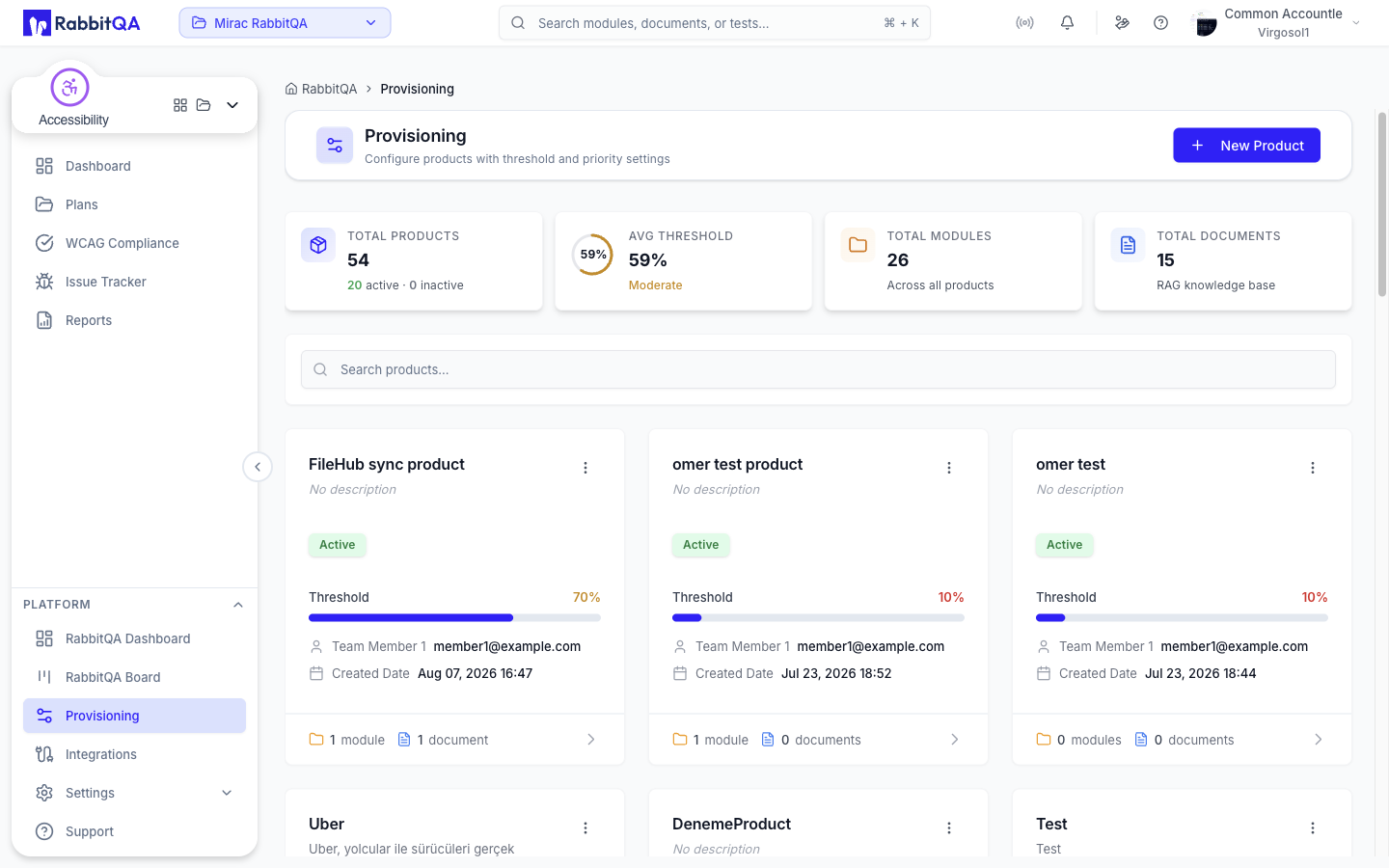
Provisioning is where you define the products that requests are raised against, together with the approval threshold and factor priorities that govern them.
Open it from Platform › Provisioning in the sidebar.
Provisioning used to sit inside SmartRequest. It is now a platform-level screen, because the products it defines are used across the organization rather than by one module. Older documentation and bookmarks pointing at a SmartRequest provisioning page are out of date.
Who can use it
Provisioning requires the organization:provisioning:read permission.
It is normally held by administrators, team leads and managers, but it can be granted to any role — if you hold the permission, the menu entry appears regardless of your role tier.
Creating a product needs organization:provisioning:create, and editing one needs organization:provisioning:update.
Products
Products are shown as a grid of cards. Each card carries the product's name, an Active or Inactive badge, its threshold as a percentage with a progress bar, who created it and when, and counts of its modules and documents. A product restricted to particular projects also shows a padlocked badge naming how many.
Above the grid, four summary cards give Total Products, Average Threshold (labelled Healthy, Moderate or Low), Total Modules and Total Documents.
Search filters the list, and the grid is paged 10, 20 or 50 at a time.
Creating a product
Select New Product to open a four-step wizard:
| Step | What you set |
|---|---|
| Product Details | Title (required), description, product content used as AI context, and an active toggle |
| Documents | The files uploaded against the product |
| Settings | The approval threshold and factor priorities |
| Approval Flow | The ordered list of approvers for this product |
Editing and deleting
Open a product to view its detail, or edit it to change its settings and documents. Deleting a product asks for confirmation, since requests reference it.
Thresholds and factor priorities
The Settings step carries two things:
- a threshold, set with a percentage slider: requests scoring above it can be auto-approved
- factor priorities, a drag-to-reorder list of the scoring factors, where 1 is the highest priority
These values are what SmartRequest reads when a request is evaluated, so getting them right up front saves correcting individual requests later.
Documents
Products can carry supporting documents, uploaded alongside the product itself. Accepted types are PDF, Word, Excel, plain text, CSV, JSON and images (PNG, JPG, GIF, WebP). They are used as AI context when a request against that product is evaluated, so upload the material an evaluator would actually need.
Related
- SmartRequest — raising and evaluating requests against these products
- Settings — organization-level configuration
