Dashboard
Your central hub for device farm overview and quick access.
Overview
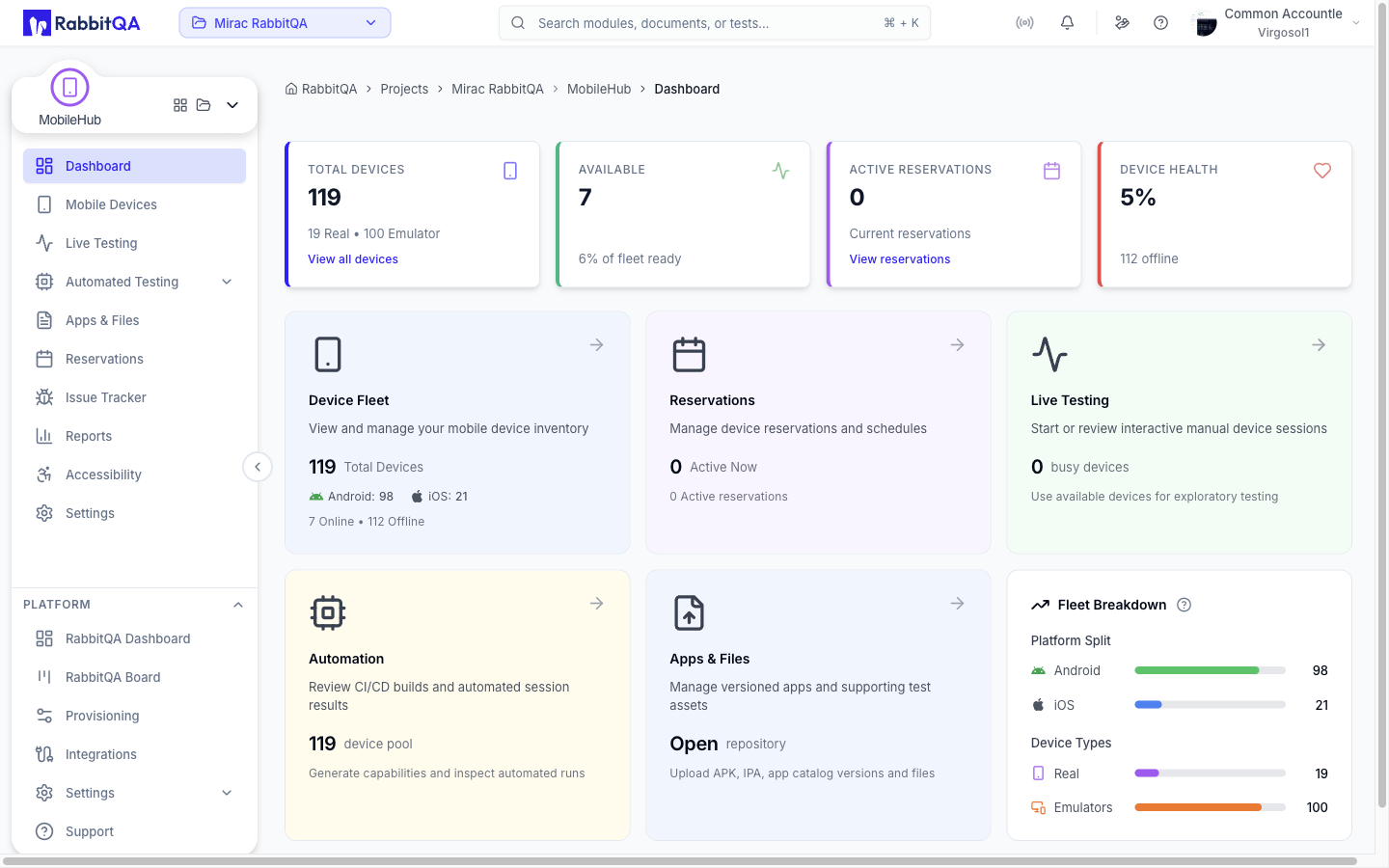
The Devicer Dashboard provides a comprehensive view of your device farm status, recent activity, and key metrics at a glance. It serves as your starting point for monitoring and managing your testing infrastructure.
Key Metric Cards
The top section displays four essential metrics about your device farm:
| Card | Description |
|---|---|
| Total Devices | Shows the total number of devices in your farm, with a breakdown of real devices vs. emulators/simulators |
| Available | Number of devices currently available for testing, including the percentage of your fleet that's ready |
| Active Reservations | Count of currently active device reservations. Click to navigate directly to the Reservations page |
| Device Health | Overall health score of your device farm as a percentage. Shows how many devices are offline |
Quick Access Cards
Feature cards provide quick navigation to key areas with inline statistics:
| Card | Information | Links To |
|---|---|---|
| Device Fleet | Total devices, Android/iOS breakdown, online/offline count | /devicer/devices |
| Reservations | Active reservation count | /devicer/reservations |
Fleet Breakdown
Visual breakdown of your device inventory showing distribution:
Platform Split
Shows the distribution between Android and iOS devices with percentage bars and exact counts.
- Green bar - Android devices
- Blue bar - iOS devices
Device Types
Shows the distribution between real physical devices and emulators/simulators.
- Purple bar - Real devices
- Orange bar - Emulators/Simulators
Recent Activity
A live feed of recent events in your device farm. Click any activity to navigate to related pages.
| Activity Type | Color | Description |
|---|---|---|
| Test Started | Green | A new test has been started on a device |
| Test Ended | Gray | A test has completed or was terminated |
| Device Added | Blue | A new device has joined the farm |
| Device Offline | Red | A device has gone offline/disconnected |
| File Uploaded | Purple | An app or file has been uploaded |
| Reservation Created | Indigo | A new device reservation was scheduled |
Most Used Devices
Shows your top 5 most frequently used devices ranked by test count. This helps identify popular devices and potential bottlenecks.
Displayed Information
- Rank - Position (#1 to #5)
- Device Name - The name or alias of the device
- Model - Device model or platform
- Test Count - Number of tests run on this device
Click on any device to navigate directly to it in the Devices page with the device highlighted.
Quota Usage
The Quota Widget shows your current usage against your plan limits:
| Quota | Description |
|---|---|
| Concurrent Tests | How many tests you can run simultaneously |
| Monthly Hours | Total testing time available per month |
| Reservation Hours | Device reservation time available |
When approaching your limits, upgrade prompts will appear to help you increase your quota as needed.
