AI Test Sessions
/casewriter/ai-tests lists every AI generation session in the active project.
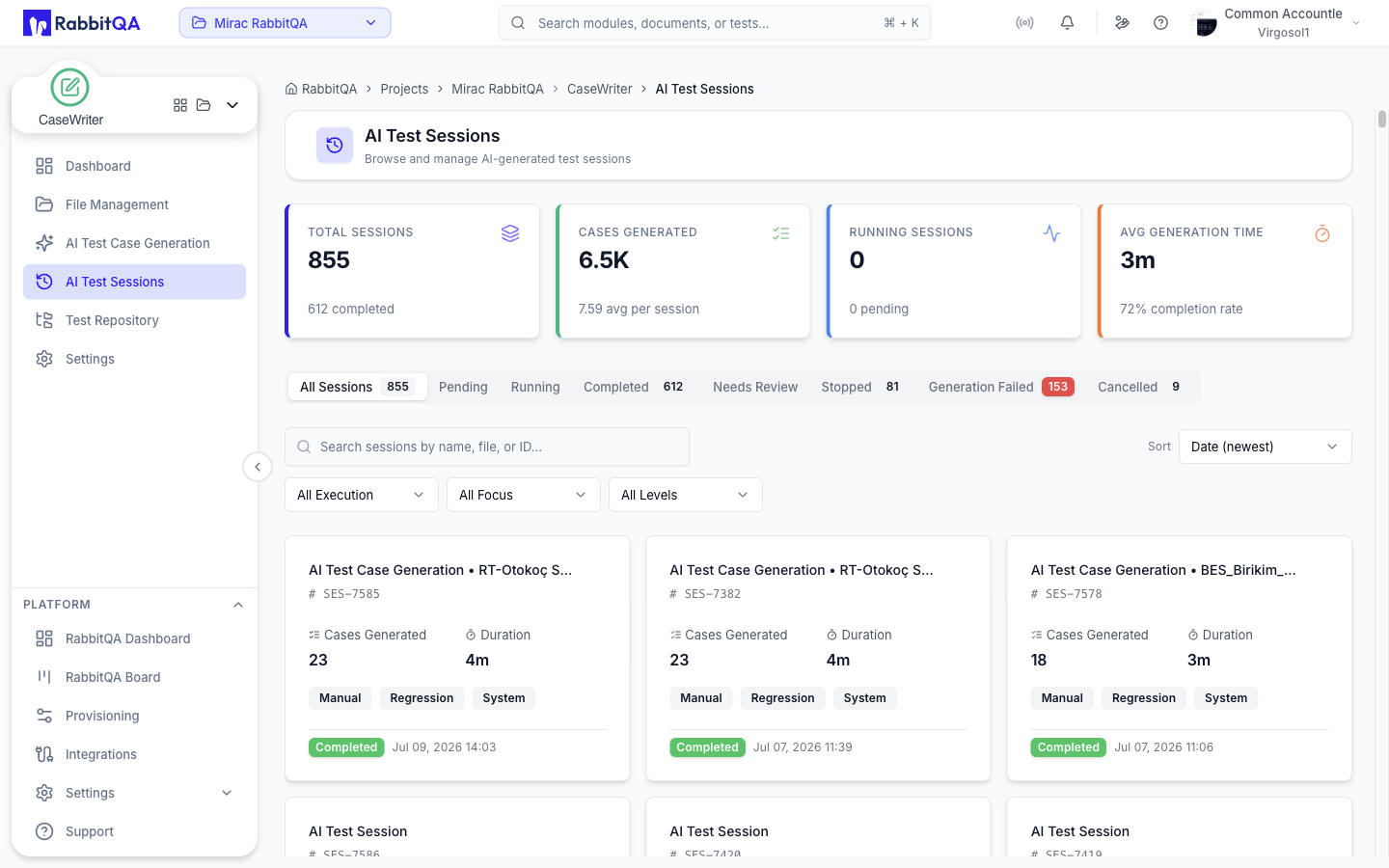
Session Metrics
Four cards sit above the list.
| Card | Shows |
|---|---|
| Total Sessions | All sessions, with the number completed |
| Cases Generated | Total cases, with the average per session |
| Running Sessions | Sessions in progress, with the number pending |
| Avg Generation Time | Average duration, with the completion rate |
Status Tabs
The list is split by session status, each tab carrying its own count.
| Tab | Meaning |
|---|---|
| All Sessions | Everything |
| Pending | Queued, not started |
| Running | Generating now |
| Completed | Finished normally |
| Needs Review | Finished, but the results want a look before use |
| Stopped | Stopped by a user |
| Generation Failed | The run failed; the card shows the reason |
| Cancelled | Cancelled |
Finding a Session
- Search matches the session name, code, source file name, or ID.
- Sort by date newest or oldest, name, status, or case count.
- Three facet filters narrow by Execution, Focus, and Level, matching the session's configuration.
When filters leave nothing on screen, the empty state offers Clear all, which also returns the tab to All Sessions.
Session Cards
Each card shows the session name, its code, cases generated, duration, and the configuration chips for execution type, focus, and level. A status badge and timestamp sit at the bottom; a failed session also shows its error reason.
The card menu offers:
| Action | Notes |
|---|---|
| Open | Opens the session detail page |
| Copy URL | Copies a shareable link to the session |
| Rename | Requires the review permission |
| Delete | Requires the generation delete permission |
Deleting a session removes the session and its generated test cases, and the metrics above the list drop accordingly.
Session Detail
Opening a session shows everything about the run at /casewriter/ai-tests/<id>.
Header
The title is the session name, with the creation date, source file name, and duration underneath. On the right sit the status badge and the available controls.
- Stop appears while the session is running.
- Re-Generate appears on a finished session that was not generated from a mindmap, and reopens the generator prefilled with this session.
- A session that carries a mindmap offers View Mindmap instead, which reopens the map so you can edit it and start a new run from it.
Running Sessions
A progress card reports the current phase, percentage, cases produced against the target, elapsed time, and an estimated time remaining. The page polls while the session is active and stops once it reaches a final status.
Banners
- A failed session shows the backend's reason for the failure.
- A Needs review session says how many of the requested cases were produced and asks you to review them before use.
Context and Configuration
A card lists the AI Model, Language, Target Count, and Platforms used for the run, plus a Testing Configuration block with execution type, focus, level, and the selected test types.
Input Sources
A summary strip shows every source the run used — documents, requirement text with its character count, URLs, PBIs, images, a tracker issue, or a SmartRequest.
Selecting it opens a dialog with the detail:
- Documents, with a download button for each file
- The full requirement text
- URLs as clickable links
- The PBI list, with the source PBI session
- Image thumbnails that open a full preview
- The linked issue's key, summary, tracker, and priority
- The SmartRequest's title, description, status, and included data
Generation Progress
A second card shows the cases produced against the target and the run duration, with a progress bar.
- If the run produced nothing, a warning explains that it finished without producing any cases and suggests checking the inputs and model configuration.
- If it produced fewer cases than the target, a quiet note explains that duplicates were left out to keep the set distinct.
Results
Below the cards, the full results list is the same surface described in AI Test Case Generation — search, sort, grouping, column filters, expandable cases, regeneration, review actions, Excel export, and Save to Repository.
Deep Links
| Link | Effect |
|---|---|
?expandRegenerated=true | Opens the session with every case expanded |
?operationId=<id> | Opens the regeneration comparison dialog for that operation |
?code=<case code> | Expands and scrolls to a single generated case |
Billing transactions and issue detail screens in other modules link into sessions this way.
Related
- Review Workflow — approving what a session produced
- AI Test Case Generation — starting a new session
- Test Repository — where approved cases land
